Queues at the time clock
Many workers, one time clock and the same start time. The minutes in the queue are paid every day.
Workers carry a Bluetooth badge. Trackers on every floor detect it and work out which zone the worker is in. Working time and breaks go straight into the timesheet – no time clock, no cards, no queue at the entrance.
A time clock records two moments a day. What happens in between stays invisible.
Many workers, one time clock and the same start time. The minutes in the queue are paid every day.
Someone forgets to clock out, someone clocks in for a colleague. It all has to be fixed by hand at month end.
You don’t know how much time goes to breaks, or whether the rules apply equally to everyone.
With IFAPP you see on screen who is in the building right now – and on which floor.
A small battery-powered Bluetooth badge in the card holder or on the lanyard. Workers don’t scan anything or need an app.
Trackers are mounted on the walls and detect the badges around them. From the signal to several trackers IFAPP works out which zone and floor the worker is in.
You decide which zones are work zones and which are break zones. Time in each zone goes into the timesheet automatically.
The building is split into zones on every floor. Each zone has a type that decides how the time is counted.
Time counts as working time from the moment the badge is detected in the zone.
The packing area, the yard and the loading dock can be zones too.
Administration, meeting rooms and the supervisors’ office.
Time in the canteen shows as a break on the worker’s timeline. Needs an extra tracker in the zone.
An outdoor smoking area can be recorded too, with a tracker on the spot.
The first and last detection in the building give the arrival and end time – automatically.
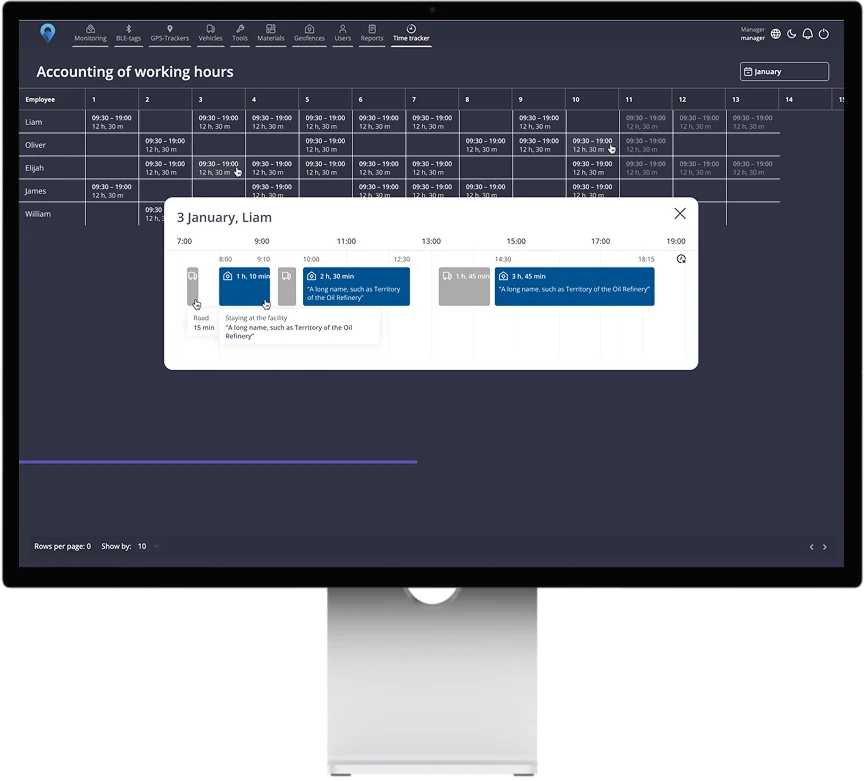
Every worker has a timeline for the day: work zones, breaks, arrival and end time. Whether breaks are paid or deducted is your decision, according to your collective agreement and your own rules. IFAPP shows the time as it is.
The trackers on each floor detect more than badges. A Bluetooth tag on equipment and materials shows where they are in the building.
See which zone and floor the forklift or machine is in.
Find the pallet without walking the whole warehouse.
Get notified when a tool leaves its zone or the building.
No two buildings are alike. At onboarding we go through your floors, halls and break areas with you and place the trackers. Our own developers adapt the view of floors and zones to your building.
Hardware: at least three trackers with SIM per floor and one extra tracker in each break area you want to record, for example the canteen and the smoking area. Every worker gets a Bluetooth badge.
Price: 159 DKK/month per tracker and 19 DKK/month per badge (7.50 DKK with 100+ devices with SIM). All features included. See pricing
Recording zones and breaks is a control measure. Workers must get written information before recording starts: what is recorded, why and for how long data is kept. In Denmark, companies covered by the agreement on control measures must give at least six weeks’ notice.
Badges are only detected by the trackers at your workplace – never outside it. You decide who may see which zones and reports. Read more about GDPR
IFAPP finds the zone and floor the worker is in, for example production on floor 1 or the canteen. It is not a position to the metre. The more trackers, the smaller the zones you can split the building into.
No. They just carry the badge. Time is recorded automatically when they walk into a zone.
Then no time is recorded, and the manager can add the time by hand. The correction is stored with name and time.
No. The badge is only detected by the trackers at your workplace. Outside it the system sees nothing.
That is up to you. IFAPP shows breaks separately on the timeline, and you choose how they count in payroll.
Timesheets can be exported to Excel. A direct integration with your payroll or ERP system can be developed on request.
Tell us briefly about your building: number of floors, employees and break areas. We visit, look at the building and suggest where the trackers should go. The meeting is free and without obligation.